Worth the Wait: Making SimKube Pod Startup More Realistic
If you’re detail-oriented, skeptical, or just enjoy watching Pod transitions in your spare time, you may have noticed a peculiar behavior in SimKube: Pods transition to Running very quickly. That isn’t because SimKube is broken but because those Pods are being simulated.
SimKube uses KWOK (Kubernetes WithOut Kubelet) to simulate large clusters efficiently. Instead of running thousands of workloads, KWOK lets us substitute simulated Nodes and Pods that behave enough like real ones to make large-scale replay practical.
Since there is no kubelet running on KWOK Nodes, KWOK is responsible for simulating much of the Pod lifecycle. The problem is that, until recently, Pods moved a little too quickly. At first glance, this seems easy to dismiss. If a Pod takes 50 milliseconds or five seconds to reach Running, it eventually gets there either way, right? Let’s take a closer look.
Real Pods spend time in Pending, images need to be pulled, and containers need to initialize. Those delays are real and vary quite a bit from cluster to cluster. Imagine pulling a light image cached on a warm Node versus a heavy image pulled from a remote registry. Now compound those differences over thousands of workloads. If every simulated Pod skips these delays, replay behavior starts to drift away from the source cluster. That difference might not matter for every workload, but it absolutely matters when you’re trying to faithfully replay cluster behavior.
In SimKube v2.7.0 we fixed this by introducing configurable image pull and container startup delays. Let’s talk about why and how.
Why Delay?
You might still be asking yourself who cares about these small delays? Well, I do, and I think you should too. So much so that I ran a small experiment this weekend. I created a kind cluster and installed the SimKube tracer1, which captures the event data needed for replay. I then applied a single deployment with 50 replicas and exported a trace. At the same time I applied the deployment, I started a small polling script that recorded how many Pods had reached Running every second. I set this up in a single script, a lazy man’s test harness, so I could repeat this when I messed it up and I did several times.
What the polling data showed was that all 50 Pods reached Running in about four seconds, with the first pods transitioning sometime between the two and three-second marks. With this baseline safely tucked away in a CSV that I won’t accidentally overwrite2, we can move into the fun stuff—simulation!
First, we need to capture the existing behavior in SimKube, so we gather the same polling data for the simulated run,
using skctl run without any configured delays. We get about what we
expect: Pods transition too quickly. In fact, all 50 Pods in our deployment had reached Running by the two-second mark
and the first pods that hit Running between zero and one second3. That’s too fast. We’ve compressed a four-second
rollout into roughly two seconds.
We can then repeat our experiment with our configured delays. If you look at figure 1, you can see that by introducing delays we largely corrected the Pod startup profile for our experimental workload. It’s not a perfect match, but the replay now behaves much more like the original workload.
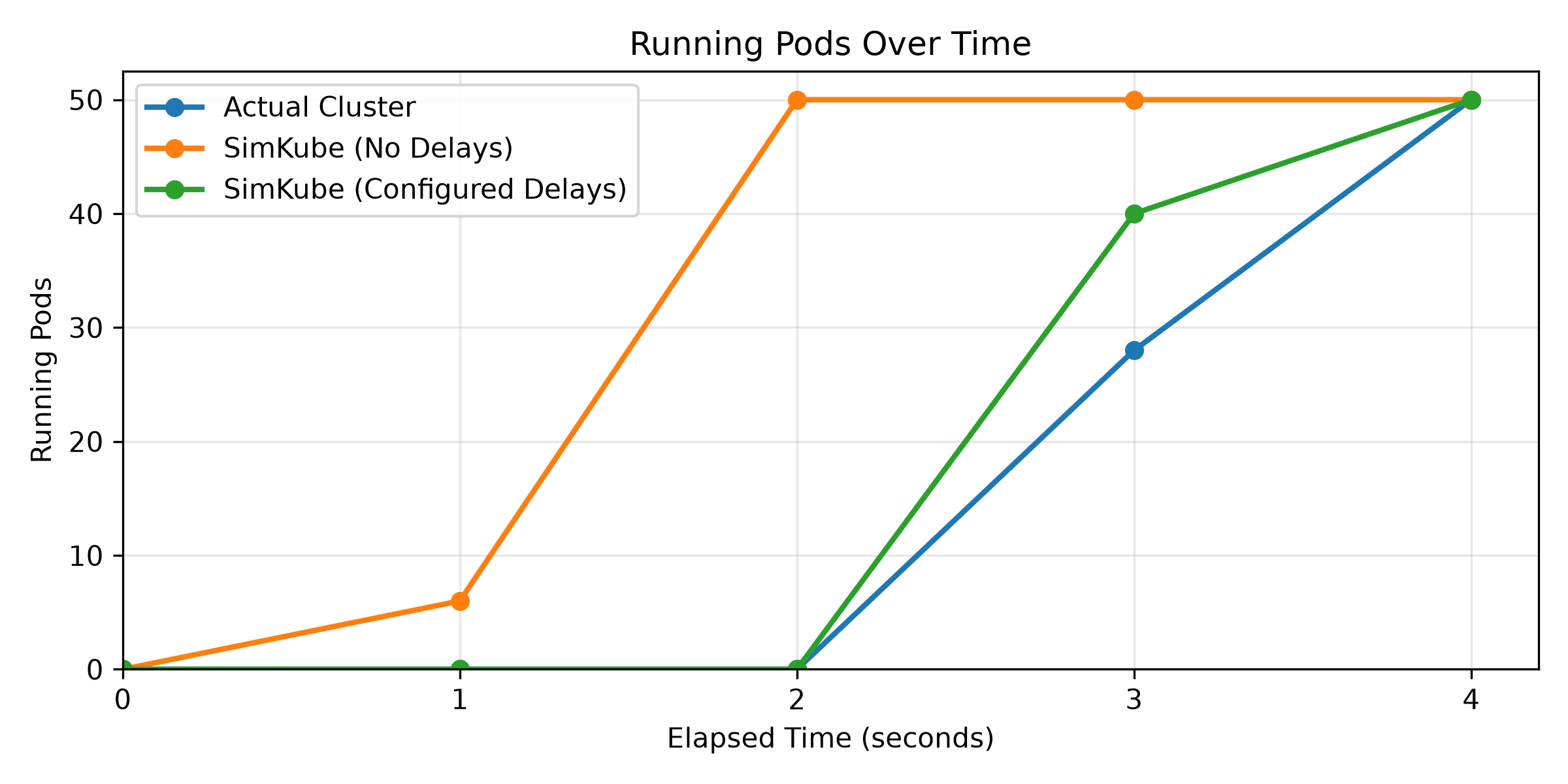
In our simple test, configurable delays moved Pod startup time in replay from roughly two seconds to roughly four seconds, much closer to the behavior of the source cluster. So how did we go about making simulated Pod startup look more like the real thing?
The Design Goals
In a simulated cluster, we want timing to be as close to the source cluster as possible. Having Pods that jump to Running too quickly introduces drift we don’t want. Our goal was to add realistic Pod startup timing to SimKube replays. Not realistic in the abstract, but realistic for the cluster being modeled. It doesn’t take much imagination to come up with examples for why these delays vary. Nearly everyone has dealt with a weirdly large image, a flaky registry, high latency regions, or a container with a lengthy startup time. By making delays configurable we can let the user decide what the delays should look like. Everyone can be unhappy in their own way.
Teaching Pods to Wait
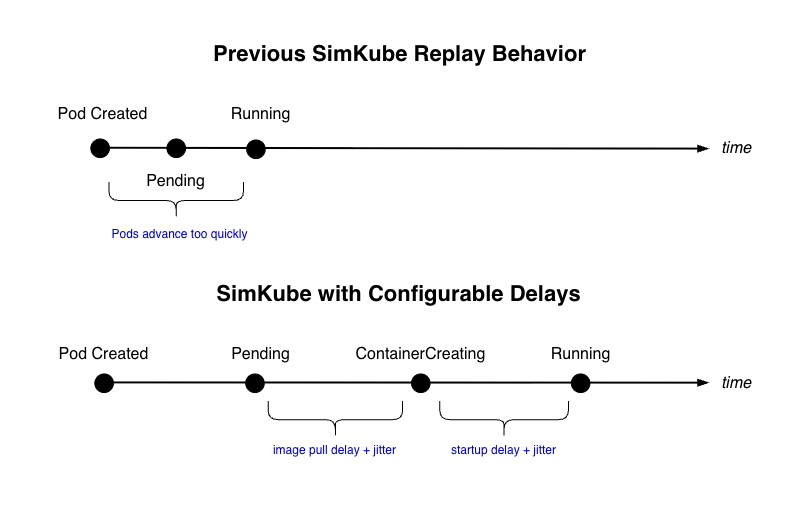
Implementation-wise, we got lucky. SimKube already uses KWOK Stages to move Pods through lifecycle transitions. The problem was that those transitions were happening almost immediately and were not yet configurable. To make startup timing more realistic, we first introduced delays and jitter between the stages to simulate image pulls and container startup. Our stages are based on the Pod General Stages in the KWOK documentation.
We introduced delays at two points in the simulated lifecycle. The first delay models image pull times. The second
models container startup before the Pod reaches Running. Figure 2 is a simplified view of the transition timeline.
SimKube now adds a new pod-create stage before the Ready transition, allowing us to model image-pull delay. The
startup delay was configured in our existing pod-ready stage.
Advanced Delays for the Curious and Crazy
In SimKube v2.7.0, delays and jitter are fully configurable, meaning that when you run a simulation you can inject the
jitter and delays specific to your production environment (in milliseconds) directly in your skctl run command:
skctl run my-simulation \
  --trace-path s3://my-bucket/my-trace \
  --image-pull-delay 1000 \
  --image-pull-jitter 1000 \
  --pod-startup-delay 1000 \
  --pod-startup-jitter 1000
These options are applied globally at the start of the simulation. For backwards compatibility, all delays and jitters default to zero so you can safely omit them if you need to reproduce or compare results with simulations from prior releases. We may revisit these defaults in a future release, but we’ll be sure to communicate any changes.
Behind the scenes, SimKube passes delay and jitter values to KWOK through Pod annotations, allowing a single set of stage definitions to be reused for all our simulated Pods. SimKube sets Pod annotations in its admission webhook the first time a Pod is seen.
Without further Delay
So why go to the trouble of adding a few seconds of delay to a simulation that already has a high level of fidelity? Because startup timing is real. Image pulls, registry latency, and container initialization all vary from cluster to cluster. By making delays configurable, SimKube can more closely model the cluster being replayed instead of assuming every cluster has similar delays.
So without further delay give our configurable delays a try in SimKube v2.7.0 and let us know what you think!
Cheers,
Ian